Twtxtk a new twtxt client
By Jason on
This software was made with the help of ai but tested by me to work well. If you don't like that then stop reading. Its your choice if you want to read.
I am introducting a twtxt client called twtxtk. It is a python tkinter gui client.
I was thinking to myself twtxt is really simple even ai can make a client. Myself has been using twtxt since 2022 but I went off and on with it. Starting with using the client called Jenny. Its not a bad client but I don't like how it sorts all new posts at the bottom. Its not a bad client I did use it a bit in that time but I felt like it was not the best ui to keep up with twtxt.
Stopped using twtxt for a bit then came back to twtxt to try Jenny again. It was fine I guess but the same issues. After that I used another client called Twtwt. Its not a bad client by any means its just a very simple client. Its made in c and is a command only twtxt client. It has no reply or thread function. But it does have a way to easly mention a user your following without typing out the feed url. Could just manually put the hash that your replying to in your message it does work to reply. At least for other clients that do show replies. But I still did not like it because it does not really show replies in a nice way.
Now for the twtxt clients that are on the web like yarn and timeline. They need a server running and sometimes with a database. Its not really as simple as a local only client that would only need somewhere on the web to store the twtxt file. The orginal twtxt client was made in python that ran on your computer in the cli. Not needing some complex database online. Nothing wrong with the web clients they do serve a purpose just not my liking with how simple twtxt.
Now going back to the twtxt is really simple even ai can make a client. It is true that its so simple ai can do it. I don't like any of the existing twtxt clients so why not see if ai can code a twtxt I like. You might be saying if twtxt is so simple why not code it myself. I could try but I am not great at programing and I wanted to see if ai could do it. Also ai might be able to do more than I could be able to do because I am not the best at programing.
You know what ai did make a twtxt client in python with tkinter. I told it to look at the twtxt spec and use that to make a client. It was not perfect at first. But it did work. After that I had to keep telling ai to tweak it to my liking. Then I posted with the client and it worked fine. It was still not to my liking so I keep telling ai to tweak it and add new features. At the end I used 93M tokens to create this twtxt client. Might be a lot but I got my desired output.
My ai setup is using pi ai coding agent. I am using GLM 5.3 flash model on openrouter. It is very cheap compared to other models. I know using ai is bad and all that but it made a quite good and not too complex twtxt client with python tkinter.
Features of the client
The client has most features one needs for a twtxt client.
- Posting with multi line support
- Feed for who your following. It saying if its a reply and who its a reply to. With a button bellow to open the thread to reply and see the thread.
- Avatars in the feed
- Threads
- Reply to a post and a post in a thread
- Fork the conversation
- User profiles and being able to follow and unfollow from the profile. As well as the users profile description and links on his profile.
- Able to follow and unfollow new users. With it suggesting the users name from the feed.
- It will change mentions in your feed and thread to be able to view their profile. Even the ones you don't have added you will be able to view their feed. From there you can follow them.
- Settings to change your nick,url,avatar,description,links,feed file and server to upload to.
- Uploading the feed over scp
- How long ago your feed has been refreshed
- Cache for posts
I been testing it for a bit and its been working really well. It has everything I would need. The only thing I would want to change is to allow a custom upload command and not just scp. Otherwise its a good client. Its the perfect way to go on twtxt for me.
Here is a screenshot of the client:
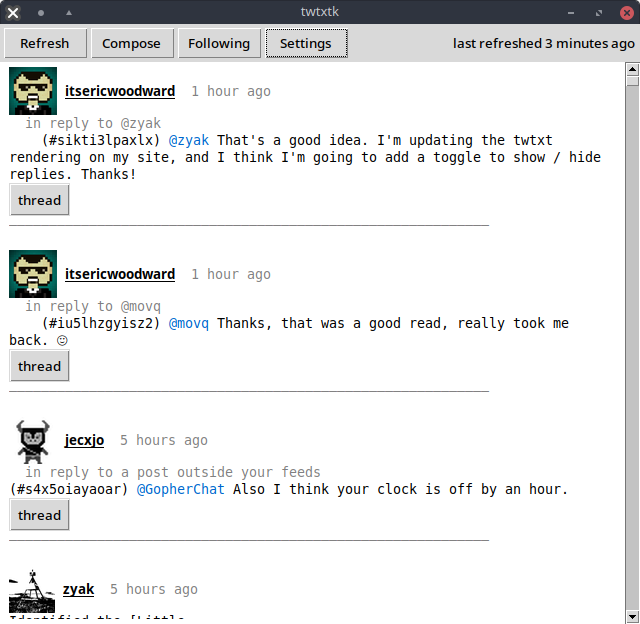
Now you seen what it looks like you might want to know how to run it? Well its a single python file. The requirements is to have a twtxt file on your disk and ssh access to your server to be able to use scp to upload. After you have those two and run the twtxtk it will make the config file at ~/.config/twtxtk/config and ask you if you want to edit the file. You need to edit it with your path to the twtxt.txt file and your target is the your server ssh login and the path to the twtxt.txt file. It should be the exact path to your twtxt.txt file including the twtxt.txt file part. Bellow that it will be a list of who your following. You can edit it with who you want to follow or add it in the gui. Then after you finish editing the file in the gui it will refresh all feeds to get the posts. If not you can press the refresh button at the top.
You will see the profile pictures of every person you follow and the posts. Those will be in ~/.cache/twtxtk/ and the feeds are in json format with all the information about that feed. Now you should be using twtxtk. I am not telling you to use it if you don't want to. Its for my own use and you can use it if you want.
If you find any issues and want to report it you can find my contact information at the contact section of this site.